
I Built a Private Datacenter on a Powerful Workstation
Glasswing is my own datacenter: local AI, everyday applications, observability, and recoverable infrastructure running on one machine in my house, with nothing rented and nothing in someone else's cloud.
I started with a fairly simple idea: I had a powerful machine, and I wanted to use more of it.
An RTX 4090, 128 GB of RAM, and a Ryzen 9 7950X are excellent for experiments. But a machine like that doesn't need to spend its life waiting for the next model inference or coding session. I wanted it to do useful work throughout the day: serve local language models, host my tools, keep my media available, and give me a place to try ideas without depending on a dozen external services.
Somewhere along the way the description changed. It stopped being "my old desktop running containers" and became something closer to the truth: a small private datacenter.
That machine is Pathfinder, my Ubuntu server. The platform running on it is Glasswing, and its configuration lives in pain459/project_glasswing.
The phrase matters because of what it implies. Every service in this post runs on hardware I own, on a network I control, with storage I can walk over and touch. No cloud account holds the application data. There is no managed database, and no vendor console sits in the middle. That also means there is no support line when something breaks at 2 a.m. The interesting part of the build wasn't the first container. It was deciding how to keep the twentieth container understandable, how to see what broke, and how to recover if the machine disappeared tomorrow.
A server with a job, not a collection of containers
My MacBook is still my daily development machine. Pathfinder handles the things that benefit from always-on compute and shared access over my local network.
The hardware has three storage roles:
- System NVMe: Ubuntu, Docker, and application state.
- Storage NVMe: AI models and experiments.
- COLD HDD: Media, books, and other slower-moving data.
That separation isn't exotic. It just makes decisions easier. Large model files don't compete with application databases by default, and media doesn't have to live beside the operating system.
I started by hosting Ollama on the RTX 4090 and making it reachable across my LAN. Models such as Qwen 3.6 27B and Llama 3.1 8B became shared compute resources rather than something tied to one terminal session. On the Mac, I could keep using OpenCode while the Linux box did the inference.
That was the first useful change: my development environment and my inference environment no longer had to be the same machine.
The design rule: one application, one stack
It's easy to over-engineer a homelab. A shared database cluster, a common service mesh, layers of automation, and a complicated deployment framework all sound appealing until the system needs a routine update.
I chose a less ambitious rule: each application should be independently deployable, and the whole setup should be understandable from Git.
Every service has its own Docker Compose definition under stacks/<name>/. The repository contains the configuration and scripts; Docker volumes hold persistent application data.
Four representative entries show the range:
stacks/
  cyberchef/compose.yaml      24 lines, one container
  it-tools/compose.yaml       31 lines, the same shape
  forgejo/compose.yaml        Git, issues, and SSH on port 2222
  infisical/compose.yaml      105 lines: PostgreSQL, Redis, and the app
The spread is the point. A one-container tool stays small, and a service that genuinely needs a database carries its own. Nothing in the middle forces a decision about a shared layer.
The repository is the deployment interface. One line in the Makefile discovers every stack from the directory layout:
STACKS := $(patsubst stacks/%/compose.yaml,%,$(wildcard stacks/*/compose.yaml))Add stacks/newtool/compose.yaml, run make up STACK=newtool, and the platform knows about the new service. No central registry, generated inventory, or separate control plane needs updating.
The same Makefile gives every stack a consistent interface:
make up STACK=ollama
make up STACK=langfuse
make ps STACK=openobserve
make logs STACK=vector
make restart-all
make restart-all is particularly useful when I change Compose environment settings across multiple stacks. Under the hood, it reconciles each stack with docker compose up instead of just restarting old containers, which matters because a plain restart won't apply changed environment variables.
That consistency comes from one macro rather than 23 copied recipes:
define run_compose
set -eu; \
 test -f "$(COMPOSE_FILE)" || { echo "[FAIL] Unknown stack: $(STACK)"; exit 1; }; \
 if [ -s "$(SECRETS_FILE)" ]; then \
   echo "[INFO] Infisical path: $(INFISICAL_PATH)"; \
   ./scripts/with-infisical.sh "$(INFISICAL_PATH)" "$(SECRETS_FILE)" -- \
     docker compose -f "$(COMPOSE_FILE)" $(1); \
 else \
   docker compose -f "$(COMPOSE_FILE)" $(1); \
 fi
endef
The macro checks that the stack exists, decides whether it declares secrets, and runs exactly one Compose command with those values in scope. The targets that call it are almost trivial:
up:
	@$(call run_compose,up -d --wait --wait-timeout 180)

check:
	@$(call run_compose,config -q)
	@echo "[PASS] Compose configuration valid: $(STACK)"
	@$(MAKE) --no-print-directory ps STACK=$(STACK)
Starting any stack now means the same thing: the name is validated, secrets are injected, and the command does not return until the containers report healthy. Adding a stack never adds a code path.
I deliberately avoided forcing applications to share one PostgreSQL or Redis deployment. Some products need their own supporting services; that's fine. Independence makes upgrades, troubleshooting, and eventual restores less surprising.
Secrets follow one rule too. Infisical is the source of truth. A wrapper injects the secrets required by a stack at deployment time. The Compose files stay in Git; passwords don't. The wrapper is scripts/with-infisical.sh. It authenticates, reads the keys listed in a stack's secrets.list, exports them for one Compose command, and exits.
Compose also fails fast when a required secret is missing. The OpenObserve-backed stacks use a pattern like this:
environment:
  ZO_ROOT_USER_PASSWORD: ${ZO_ROOT_USER_PASSWORD:?Required from Infisical}
Where two components need the same credentials, as with OpenObserve and its collectors, I reuse the existing Infisical path rather than maintaining copies.
The result is not Kubernetes. It doesn't need to be.
What's actually running?
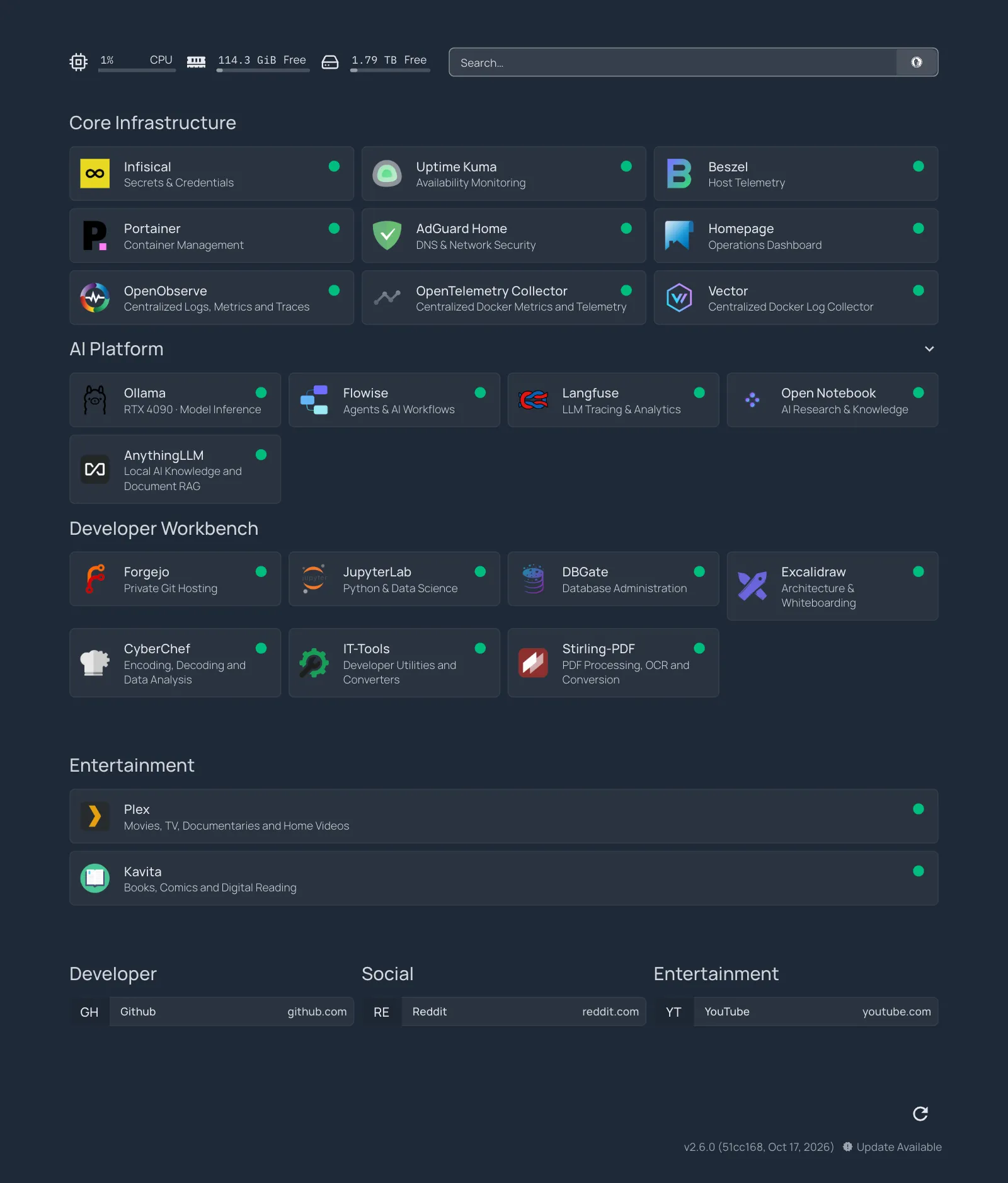
The homepage is the map of the platform. Each card is a service, and the green dot is a live availability check. The top bar shows host CPU, memory, and storage. It's the first place I look when something feels wrong, because it answers the basic question: is the service reachable?
The applications fall into a handful of groups. I think about them by purpose, not by how many icons fit on a dashboard.
AI and language models
- Ollama serves the models. It loads them onto the RTX 4090 and exposes one endpoint on port 11434, so the Mac, a notebook, or a script all talk to the same place instead of each holding its own copy.
- AnythingLLM is the document chat interface. A workspace indexes a folder of files and answers questions through Ollama, which keeps the source material on the machine.
- Flowise is the visual builder for agent and retrieval flows. It's useful when a workflow is easier to sketch than to write as a service.
- Open Notebook is the research workspace: collect sources, generate notes, and keep the threads of an investigation in one place.
- Langfuse records what instrumented LLM applications actually do: prompts, latency, token usage, and evaluation results.
Developer tools
- Forgejo is the Git server, with repositories, issues, and SSH access on port 2222, so normal Git workflows behave as expected.
- JupyterLab runs notebooks that need the GPU. It's token protected, since a notebook server is a shell with extra steps.
- DBGate is the database client. Inspecting a table should not require installing a desktop app on every machine.
- Excalidraw is for diagrams and architecture sketches.
- CyberChef handles decoding, hashing, and one-off data transforms without pasting sensitive strings into a website.
- IT Tools covers the small converters and generators I would otherwise search for and land on an ad-funded page.
Everyday services
- Plex is the media server. It runs on the host network with GPU transcoding, so a phone can stream a file it could not decode on its own.
- Kavita holds books and comics, and remembers reading progress across devices.
- Stirling-PDF merges, splits, and converts PDFs locally, which matters when the document is a contract or an ID.
- AdGuard Home filters DNS for the whole network, including devices that cannot install an ad blocker.
Operations and observability
- Homepage is the dashboard and the map: a static page with widgets, not a source of truth.
- Portainer shows containers, images, and volumes, and answers "what changed?" faster than any command I remember.
- Uptime Kuma runs the availability checks and keeps their history.
- Beszel reports host health from a small agent: CPU, memory, disk, and temperature.
- OpenObserve is where logs, metrics, and traces are stored and queried.
- OpenTelemetry Collector pulls container metrics from the Docker Engine and accepts OTLP from anything that emits it.
- Vector reads Docker stdout and stderr and forwards them into OpenObserve.
Infisical sits underneath all of it as the secret store. Docker Compose and Make are the deployment surface, and Restic is the way back.
Not every application talks to every other one. That's intentional. The point is to have a set of useful tools with clear boundaries, not a tangled platform where updating one component becomes an event.
Homepage, Portainer, Uptime Kuma, and Beszel overlap a little, but each answers a different operational question: navigation, container state, availability, and host health.
Architecture: simple on purpose
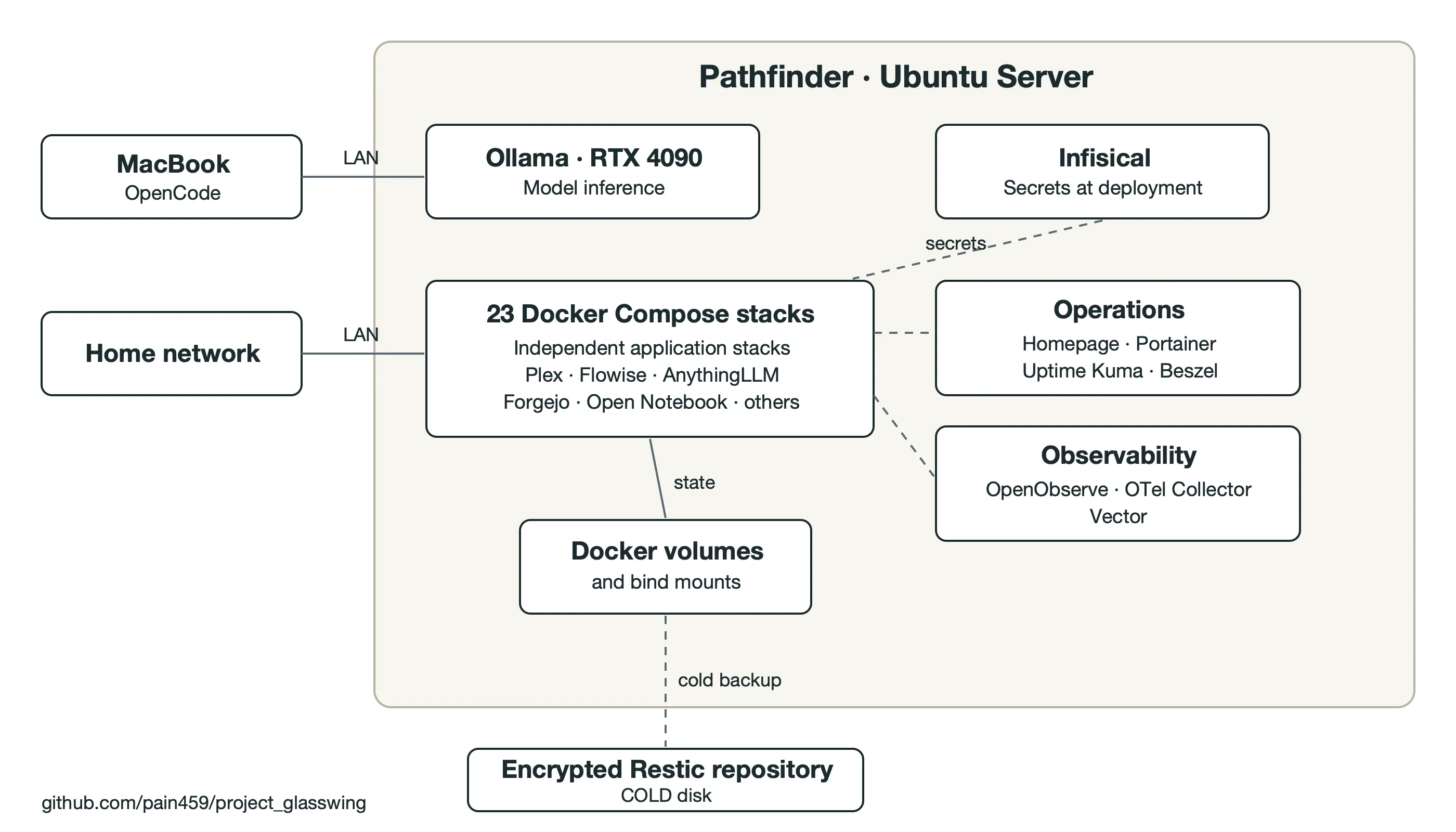
There's a real benefit to drawing the diagram: it makes missing boundaries obvious. The AI runtime doesn't have to own the application platform. Secrets don't need to live in the Compose files. Monitoring doesn't need to be baked into each service.
The drawing matches the repository. Each box is a separate stack or a small set of stacks, and the arrows are the only contracts between them. That's why the Makefile can stay small: it does not need to know what each application does.
The point where "it's running" stopped being enough
As the stack grew, I ran into the familiar problem of self-hosting: every service looked healthy until something didn't.
A container can be running while an application is failing. A web page can load while a background worker is stuck. A model endpoint can answer requests while an embedding workflow is silently producing errors.
That pushed me to build observability in layers.
Uptime Kuma checks availability. Beszel covers host-level health. For a deeper view, I added OpenObserve as a central place to query telemetry.
Next came a single OpenTelemetry Collector. It connects to the Docker Engine and collects container resource metrics such as CPU, memory, and network activity without needing a sidecar in every Compose stack. Apps that actually support OpenTelemetry can send their own traces and metrics to the same collector. The configuration is in stacks/otel-collector/collector.yaml.
Then I added Vector for Docker stdout and stderr logs. One Vector container discovers the others and forwards their logs into an OpenObserve stream. No per-application log shipping stack, and no configuration to repeat across 23 Compose projects. Its pipeline is in stacks/vector/vector.yaml.
The first integration wasn't flawless. Vector could see logs but OpenObserve rejected its requests with Unauthorized. That was a useful reminder: a healthy collector is not proof that telemetry reached its destination. Authentication, ingestion, and the stream itself all have to be verified end to end.
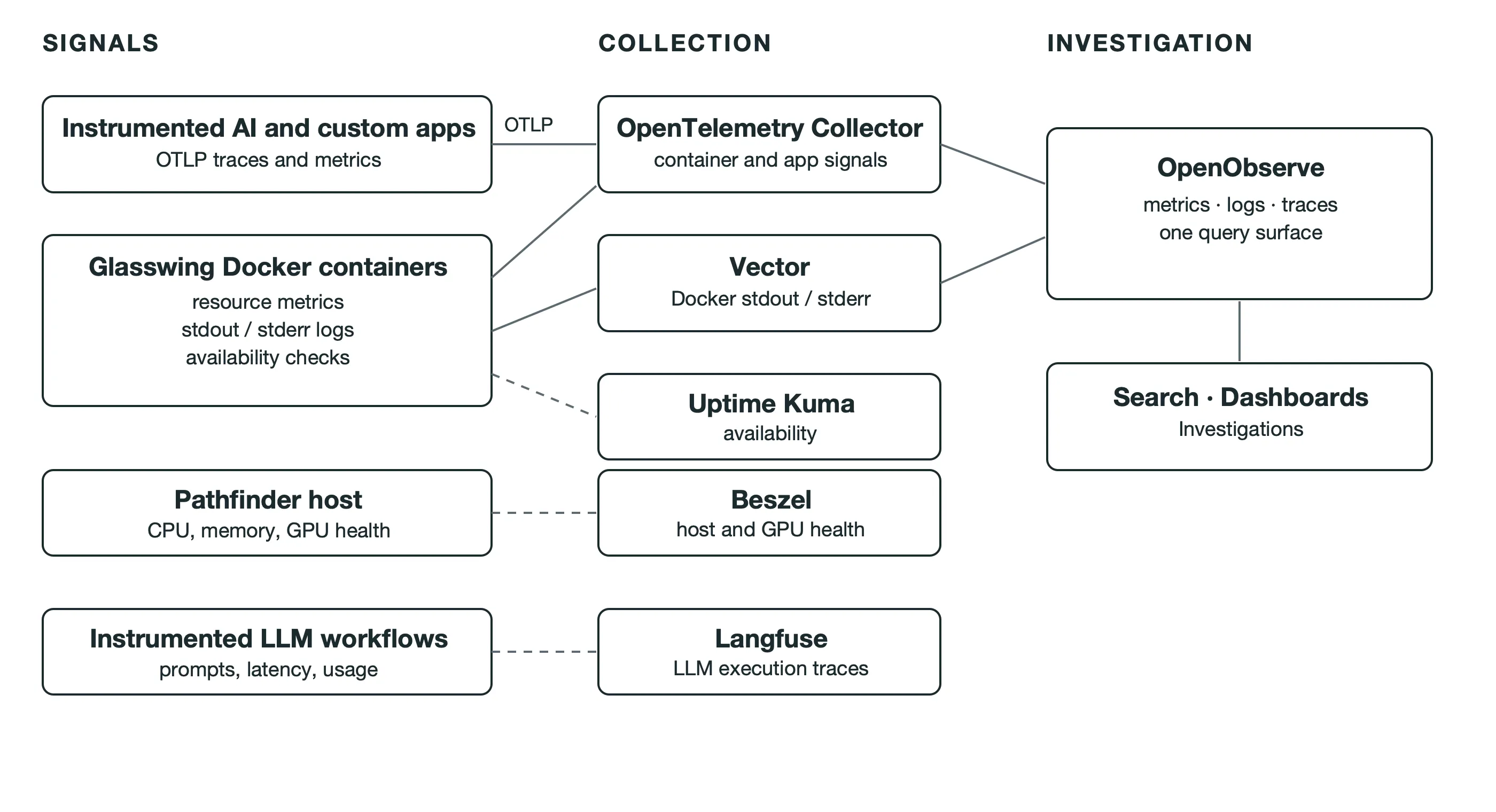
This also explains where Langfuse fits. OpenObserve is for infrastructure and general application telemetry. Langfuse is more specialized: it helps inspect LLM calls, latency, prompts, model usage, and execution paths for workflows integrated with it. Running Langfuse alongside Ollama doesn't automatically trace every model request; an application has to send that data. Both kinds of visibility matter, but they answer different questions.
Finally, I set a 10-day retention window in the OpenObserve stack. Collecting everything forever isn't observability; it's eventually a storage problem.
Backups changed how I think about ownership
Once Infisical, the databases, media metadata, dashboards, and application configuration were living on one box, I had to ask a less exciting question: what happens when the box fails?
I chose Restic for encrypted, deduplicated backups. Rather than building 23 separate backup jobs, I went with one application-state snapshot covering the Glasswing repository, Docker volumes, relevant host configuration, and certificates. The procedure and recovery steps are in the backup runbook, and the implementation is in backup/scripts/backup.sh.
For consistency, the current procedure takes a cold backup: it records which Glasswing containers are running, stops applications and their databases, captures the data, and starts only the containers that were running before. It trades a brief maintenance window for a much simpler recovery model.
The backup deliberately excludes what I can recreate: large Ollama model downloads and media libraries. The critical material is harder to rebuild: the Infisical database, application state, Plex metadata, Forgejo repositories, and everything that makes the platform mine.
The encrypted Restic repository currently lives on the COLD disk. The script checks the filesystem UUID before writing, so a missing mount cannot silently fill the root filesystem:
ACTUAL_UUID="$(findmnt -rn --mountpoint "$BACKUP_MOUNT" -o UUID)"
[[ "$ACTUAL_UUID" == "$EXPECTED_UUID" ]] || {
  echo "[FAIL] Wrong or missing COLD filesystem"
  exit 1
}
The encryption password is held outside Infisical, with an offline recovery copy. Losing Infisical must not lock me out of the backup needed to restore it.
The manual backup, the repository checks, and a test restore all succeeded. That matters more than a green "backup completed" message. The next step is scheduling, recovery health checks, and a second copy outside Pathfinder. A backup on another drive in the same machine is useful, but it isn't protection against losing the machine.
What this setup makes possible
Once the platform existed, the interesting question changed. It stopped being "what else can I host?" and became "what does this actually unlock?"
The first answer was documents. AnythingLLM points at Ollama, so I can create a workspace, drop in a folder of PDFs, and ask questions about them. The text never leaves the LAN. That sounds like a small thing until you have internal notes, old papers, or a pile of scanned invoices you would rather not upload to someone else's service.
The second was the GPU. One model endpoint on port 11434 now serves whatever asks for it: the Mac during the day, a notebook in JupyterLab in the evening, an agent flow in Flowise, or a script at 1 a.m. At some point I stopped thinking about which machine has the model and started treating it like a utility.
The quieter value is harder to put in a screenshot. Forgejo keeps repositories and issues on the same box that builds and runs them. Plex transcodes on the GPU and Kavita holds the books, so the library works without another subscription. AdGuard Home means the whole house gets DNS filtering, whether or not a device supports it. I keep a scratch area for prototypes, and only the ideas that survive a few weeks of daily use get promoted to something permanent.
What I didn't expect was how useful the platform would be for learning reliability. These are services I actually use, so when a log pipeline drops events or a restore fails, the feedback arrives immediately and the stakes stay low. A mistake costs me an evening, not a customer. That's a good size of problem to learn on.
There is also an economic argument that I find more convincing than the privacy one. A new service costs a Compose file and some RAM. Nothing expires, nobody counts seats, and no plan upgrade appears when a second person wants to use something.
The trade-off is simple: I am the operations team. I own the hardware, the power bill, the certificates, the upgrades, and the 2 a.m. page. In exchange, I own the data, the boundaries, and the decisions.
What I would do differently
A few lessons became clearer during the build:
- Make the common operation easy. A predictable
make up STACK=namebeats remembering 23 slightly different commands. - Keep application boundaries visible. Independent Compose stacks are easier to reason about than shared dependencies everywhere.
- Don't confuse health with visibility. Container uptime, host metrics, searchable logs, and LLM traces tell different parts of the story.
- Test the whole path. Telemetry isn't working until it arrives. Backups aren't working until something restores.
- Protect the things you cannot casually recreate. Configuration, databases, keys, and history matter more than easily downloaded binaries.
- Stop adding services when they stop solving problems. Running software is not the goal; making the machine genuinely useful is.
Where Glasswing goes from here
Pathfinder started as a way to get more value out of a powerful desktop. It's become my private platform for AI experiments, development tools, media, and infrastructure learning.
The most satisfying part isn't the number of services. It's that I can explain how they fit together, update them with familiar commands, see what they're doing, and recover their state when something goes wrong.
There's still work to do, and most of it is integration rather than new services.
Integrations I want next
- Traces all the way down. Most services currently contribute logs and metrics. Instrumenting the two or three applications I care about most would let one request be followed from a Forgejo webhook to a build to an Ollama call as a single trace in OpenObserve.
- Instrumented LLM workflows. Langfuse is running, but it only sees applications wired to send it data. Adding that instrumentation to OpenCode and AnythingLLM would make prompt, token, and latency history visible per workflow instead of per container.
- One identity for everything. Each service has its own local account today. A forward-auth proxy in front of Homepage would give one login and one place to revoke access when something is retired.
- Remote access without open ports. A WireGuard or Tailscale peer on Pathfinder would make these services reachable from outside the LAN without exposing a port to the internet.
- Alerts that actually arrive. Uptime Kuma can already notify, but its alerts and Beszel's thresholds should arrive in one place. A local ntfy instance would keep the alert path inside the network too.
- Backups that leave the building. A
restic copyto a second machine or an encrypted off-site disk closes the last gap that matters. - A model gateway. LiteLLM in front of Ollama would add per-client keys, quotas, and fallbacks, and would make it obvious which application is consuming the GPU.
- Dashboards from real signals. OpenObserve panels for the four things I check by hand: ingestion rate, error rate, disk headroom, and backup age.
None of this needs new hardware. That's the difference between a stack that runs and one that explains itself.
But the foundation now feels right: simple deployment, clear ownership, useful visibility, and a recovery plan that has actually been tested.
Everything is in pain459/project_glasswing: the full stack list, every Compose file, the Infisical secrets wrapper, and the backup runbook. Use it, fork it, or take it apart for the parts that are useful to you.
If you have a machine that spends most of the day idle, you probably have the beginnings of one of these too. Take the repository, delete the stacks you don't need, change the IP addresses, and start with two or three services you will actually use. Add the rest when a real need appears. That's how this one grew, and it's still the advice I would give first.
That's the kind of private datacenter I wanted to build.